Analytics
Superwall for iOS
Your revenue, campaigns, paywalls, and an agent that answers questions about them — in the official Superwall app for iPhone.
Subscription revenue doesn't wait for you to get back to your desk. A launch goes out, a price test starts, or a campaign begins to spend, and the question is always the same: is it working? The Superwall iOS app answers that from your phone. It reads the same data as the web dashboard, so what you see in line at the coffee shop matches what your team sees on Monday.
See your app on the go
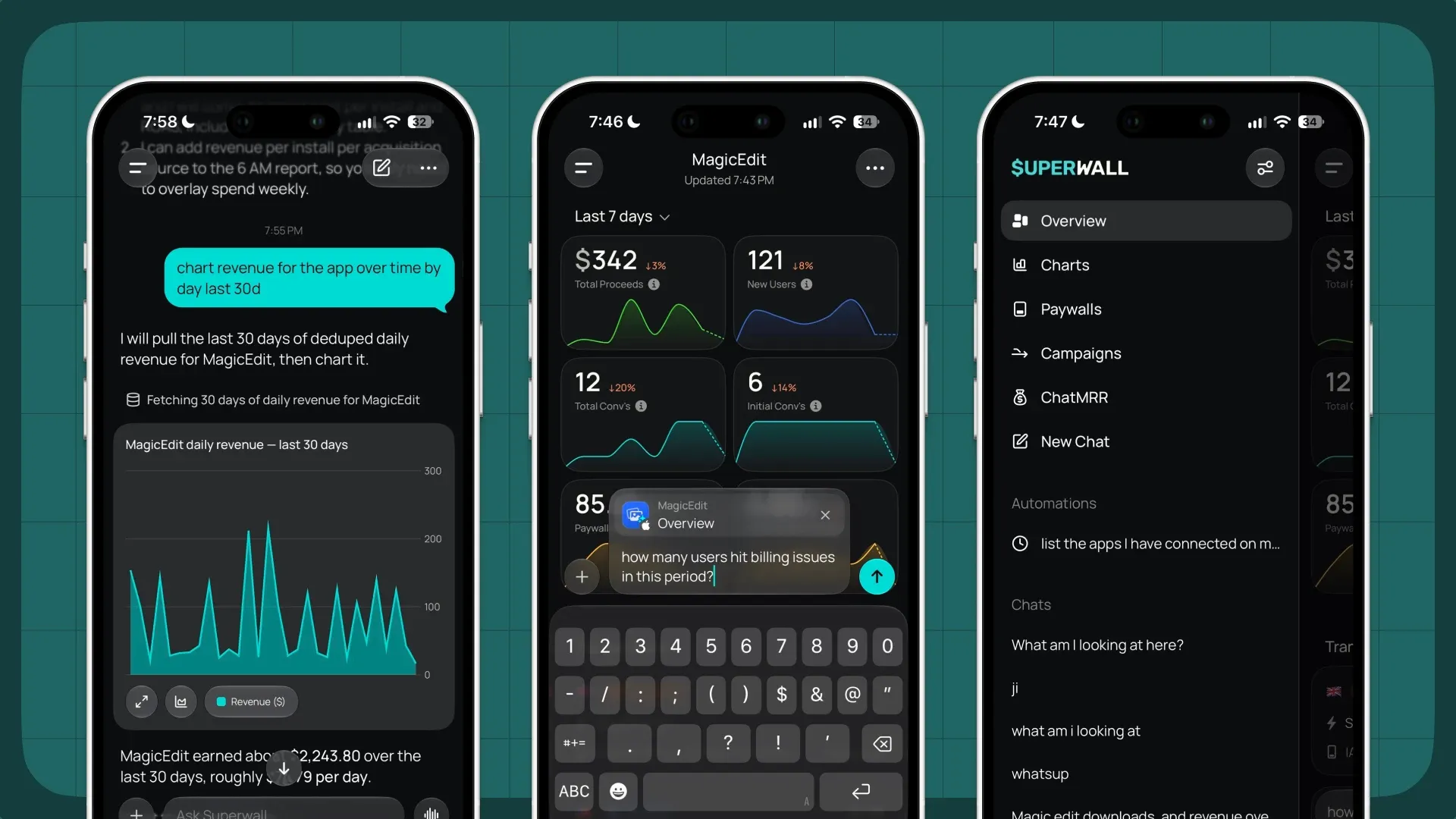
Open any app and the overview shows what matters for the period you pick: total proceeds, new users, total and initial conversions, and paywall performance, each with its trend and the change from the previous period. From there you can open any of the dashboard's charts, change the date range, apply filters and breakdowns, and drag across a chart to read individual data points.
-
Revenue at a glance. Proceeds, MRR, and ARR for each app, with home screen widgets so you can check them without opening anything.
-
Campaigns and paywalls. Look over your campaigns and the paywalls inside them to see what's live and how it's performing.
-
Every transaction. Tap into a transaction for the full breakdown, including purchase details and the SDK events that led to it.
-
Data you can hand off. Export any chart to JSON or Markdown in one tap and paste it into Claude, ChatGPT, or a team thread.
Ask Superwall anything
The app has Superwall Agents built in. Type a question the way you'd ask a teammate, such as "chart revenue for this app by day for the last 30 days" or "how many users hit billing issues in this period?", and the agent fetches the data, draws the chart in the conversation, and explains what it found. The composer picks up the screen you're on, so a question asked from an app's overview is already scoped to that app.
Past chats stay in the menu so you can pick a thread back up, and your automations live there too: a scheduled weekly readout or daily anomaly check runs on its own, and you can read the result wherever you are.
Read the Agents docsWho it's for
- Founders and indie developers who want to see how yesterday went before they open a laptop.
- Growth teams watching a paywall experiment or price test in its first hours, when the early numbers decide whether to keep going.
- Anyone on call for revenue who needs to check a dip or spike quickly and get an explanation instead of a raw number.
Get started
Download the Superwall app from the App Store and sign in with your Superwall account to see your apps. New to Superwall? Create an account and connect your app, and its data will show up on your phone too.
Download on the App Store