Introducing Customer Center
Cancellations, refunds, plan changes, and restores, all without leaving your app (or emailing you).

Customer Center is here! Starting with version 4.18.0 of our iOS SDK, your users get a screen where they can see everything they're subscribed to, App Store and web purchases alike, and manage it all without leaving your app. And presenting it is a one-liner:
Superwall.shared.presentCustomerCenter()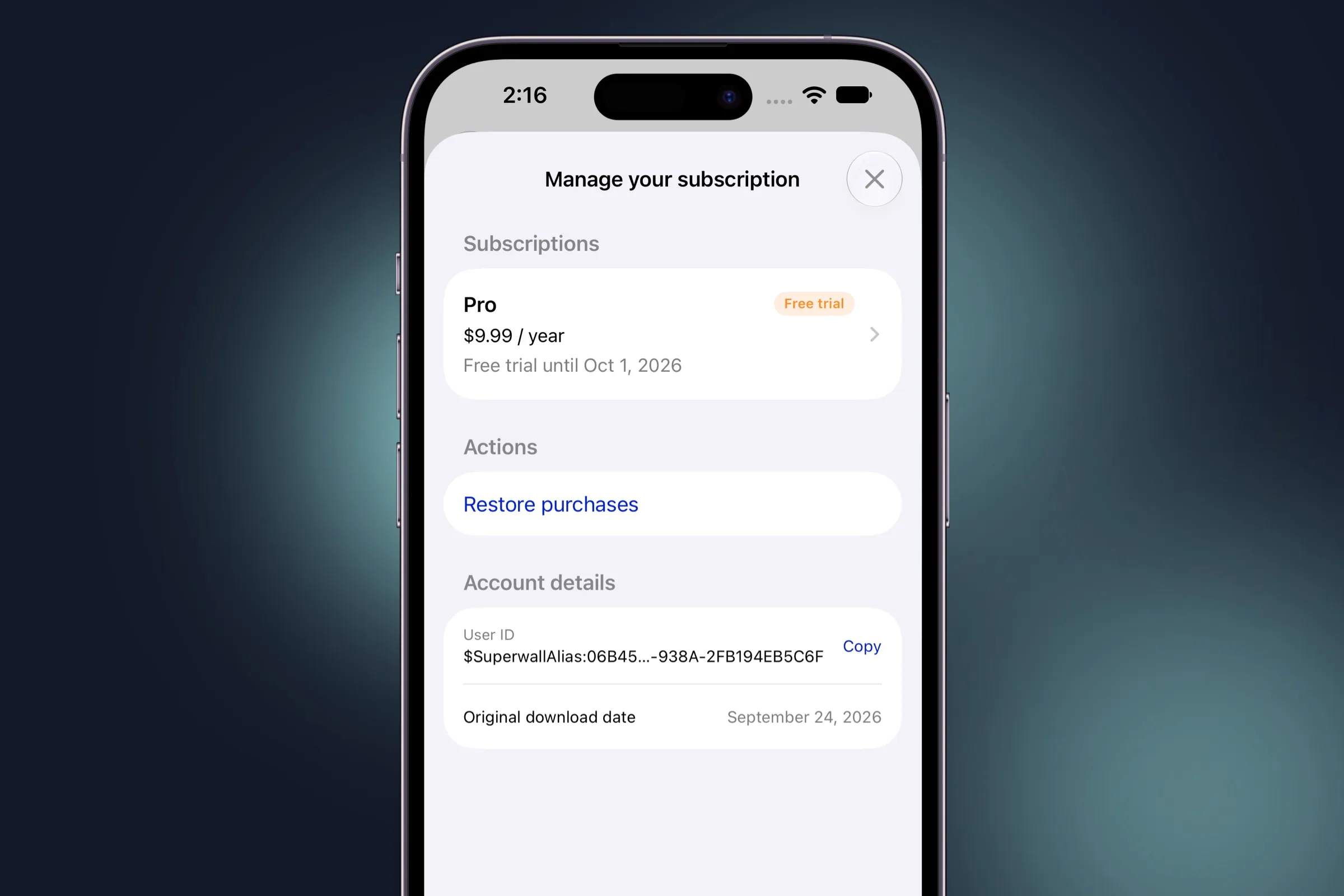
Let's take a look at some of the reasons you'd reach for it.
Fewer support emails
If you run a subscription app, you've answered "How do I cancel?" and "I paid, so why is it still locked?" more times than you'd like (I know I have). This isn't a great use of your time, or your customers'. Plus, it's easily answered — even more so with Customer Center. It lets people sort those kinds of questions out on their own. They can cancel, request a refund, switch plans, or restore their purchases, and anyone on an out-of-date build sees a banner asking them to update.
And for the emails that still come in, their user ID is right there under Account details, with a Copy button, next to the date they first downloaded your app.
Native StoreKit under the hood
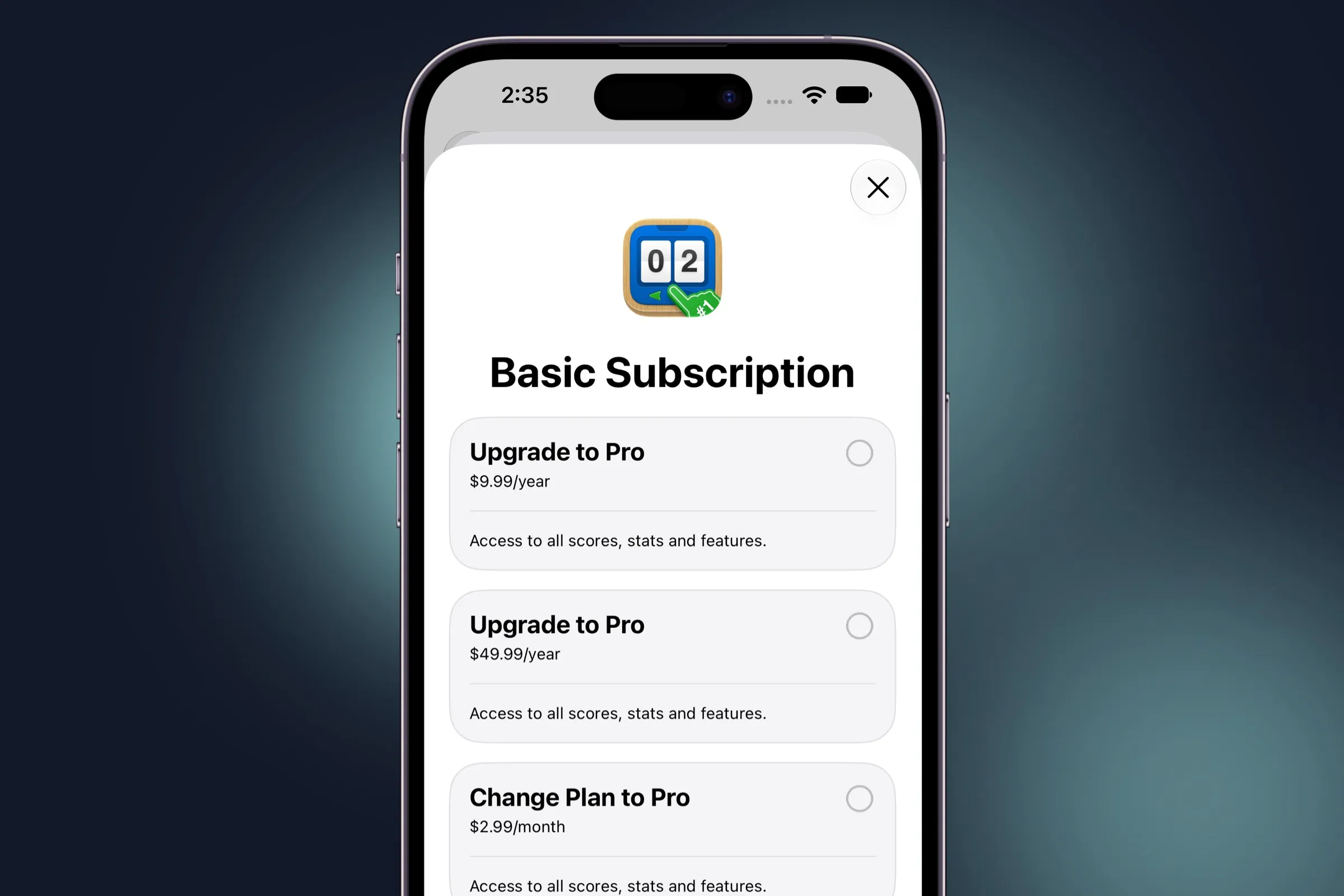
For App Store subscriptions, Customer Center hands the billing changes
to Apple's own StoreKit APIs. Change plan
opens StoreKit's SubscriptionStoreView, Cancel subscription opens Apple's Manage Subscriptions
sheet, and refunds go through refundRequestSheet. Your users
get Apple's own screens for all three, and Apple handles the actual
change.
Find out why people cancel
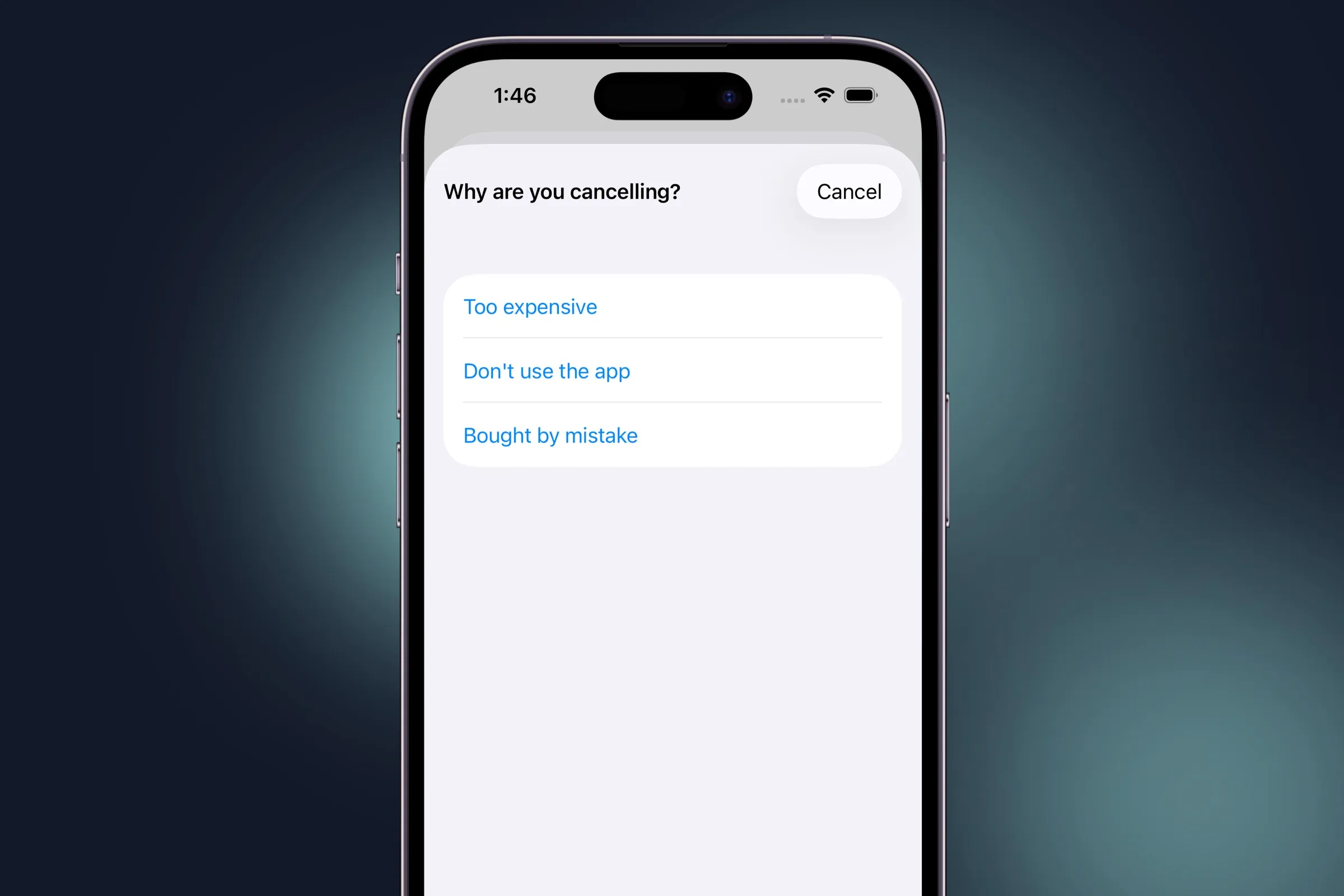
Ever wonder why someone cancels? Now you can just ask them. Tapping
Cancel subscription brings up a quick survey right before Apple's Manage
Subscriptions sheet opens. It's on by default with three answers (too
expensive, don't use the app, and bought by mistake), but you can swap
in your own. Each answer fires a
customerCenterSurveyResponse event, so you can pick it up
in handleSuperwallEvent(withInfo:) and send it wherever you
keep your analytics.
App Store and web purchases on one screen
Selling on the web with Superwall, too? Those subscriptions show up alongside the App Store ones, price and renewal date included. That's something Apple's Manage Subscriptions sheet can't do, since it only knows about the App Store. And each web subscription's Manage button already points at your hosted management page, so there's nothing for you to set up.
If someone's paying on the App Store and the web at the same time (hey, it happens), Customer Center warns them so they can cancel one before they're charged twice.
Getting started
Update to 4.18.0 and call presentCustomerCenter(). The
defaults are good to go as they are. If you're using SwiftUI, there's a
view modifier for it, too:
struct SettingsView: View {
  @State private var showsCustomerCenter = false

  var body: some View {
    Button("Manage subscription") {
      showsCustomerCenter = true
    }
    .presentSuperwallCustomerCenter(isPresented: $showsCustomerCenter)
  }
}
Customizing Customer Center
Just about everything in Customer Center can be changed through
SuperwallOptions.customerCenter. You decide which rows show
up and in what order, rename any of them, add links to your own pages
(in-app or in the user's browser), and put a survey in front of any row,
with your own question and answers. For example, a Contact support row only appears
if you add a support email. It's all entirely up to you:
let config = CustomerCenterConfiguration.default

// The rows you want, in the order you want them
config.managementScreen.paths = [
  .restore,
  .changePlan,
  .manageSubscription(survey: .cancellation),
  .url(URL(string: "https://yourapp.com/faq")!, title: "FAQ"),
  .contactSupport
]

// Optional: without an email, Contact support stays hidden
config.support.email = "[email protected]"

// Tint it to match your app
config.appearance.accent = .init(light: "#4F46E5", dark: "#818CF8")

let options = SuperwallOptions()
options.customerCenter = config
Superwall.configure(apiKey: "YOUR_API_KEY", options: options)
Beyond that, you can:
- Only offer refunds within a set window after purchase, or limit Change plan to specific products in your subscription group.
-
Add custom rows that run your own code. You'll hear about the tap in
CustomerCenterDelegate. - Tune the update banner. It checks the App Store for a newer version on its own, but you can supply the latest version yourself or turn it off.
- Hide the account details section or the duplicate subscription warning.
- Change the titles on each screen, and pick the rows for people who haven't bought anything yet.
- Send web subscriptions to a different management page.
-
Present it as a sheet, or embed
CustomerCenterViewin your own navigation stack so it pushes like any other screen.
You can set it all once in SuperwallOptions, or pass a
different configuration each time you present it. And
CustomerCenterDelegate keeps you posted on row taps, survey
answers, and refund requests. It can even step in before a restore, say,
to have someone sign in first.
Customer Center needs iOS 15 or later (iOS 17 to change plans), and it's already localized into 41 locales. For the full rundown of options, check out the Customer Center docs.
And, this is just the start. I've got a lot more planned for Customer Center. But for now, here's to fewer "How do I cancel?" emails.